Blob Opera
How to Play Blob Opera
1. Open the game in your web browser – no downloads needed.
2. Use your mouse or tap on the blobs to select them.
3. Click and drag each blob up or down to change its pitch.
4. You can also tap on a blob repeatedly to create different notes.
5. On a keyboard, use mouse movement combined with clicks; keyboard keys are not specifically assigned.
6. On mobile devices, use your finger to tap and drag blobs vertically.
7. Experiment with different combinations to create unique operatic harmonies.
8. Enjoy the real-time audio feedback as blobs sing your chosen notes.
9. There is no scoring system – play freely and creatively.
10. Refresh the page to start a new composition anytime.
What is Blob Opera?
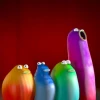
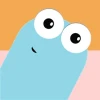
Blob Opera is a whimsical and experimental browser game created by David Lee in collaboration with Google Labs. It invites players to create unique operatic music by interacting with four colorful blobs, each representing a different vocal range. This free online game offers a playful way to compose melodies by adjusting notes and pitch, producing charmingly harmonious or hilariously off-key operatic sounds. Blob Opera’s quirky characters and simple interface make it accessible for all ages, encouraging creativity and musical exploration without requiring any prior knowledge of music theory.
Gameplay & Features
- Interact with four blobs representing soprano, alto, tenor, and bass voices.
- Click or tap on each blob to control their pitch and tone.
- Use mouse or touch gestures to drag blobs up and down, altering their singing notes.
- Generate unique opera compositions by combining different vocal ranges.
- Experiment with harmonies to create either beautiful or amusingly discordant sounds.
- Simple, intuitive controls suitable for keyboard, mouse, and touch devices.
- Play now instantly in your browser with no downloads or installations.
- Perfect as an unblocked game for schools and workplaces.
Related & Series Games
For fans of Blob Opera’s creative and musical gameplay, there are other engaging browser games that offer similar interactive experiences. Game 1 focuses on rhythm and timing, challenging players to press keys in sync with music beats using keyboard controls. Game 2 offers a touch-friendly interface where players compose melodies by tapping colorful notes on screen, perfect for mobile devices. Game 3 combines visual puzzles with sound creation, encouraging players to solve challenges by manipulating musical elements. These titles emphasize easy-to-learn mechanics paired with creative freedom, making them ideal for casual play and music lovers alike.
Tips & Strategies
- Experiment with varying pitches between blobs to find harmonious combinations.
- Use slower note changes to create smooth, flowing melodies.
- Try layering contrasting notes for comedic or dramatic effects.
- Play with timing by clicking blobs at different intervals to mimic opera phrasing.
- Record your favorite compositions to share with friends or revisit later.
- Use headphones for the best audio experience to catch subtle vocal nuances.
Game Elements
- Four animated blobs representing distinct vocal ranges: soprano, alto, tenor, bass.
- Interactive pitch controls allowing drag and click inputs.
- Simple UI designed for accessibility on desktop and mobile browsers.
- Audio synthesis engine generating real-time opera-like vocal sounds.
- Visual feedback through blob animations synchronized with singing.
FAQ
Is Blob Opera free to play?
Yes, Blob Opera is completely free to play online.
Can I play Blob Opera on any device?
Yes, it works on desktop browsers and mobile devices with touch controls.
Is Blob Opera unblocked for schools?
Often yes, since it is a safe, educational, and creative browser game.
Do I need to download anything?
No, Blob Opera runs entirely in your browser with no downloads required.
How do I interact with the blobs?
Use mouse clicks, drags, or tap gestures on touchscreens to control pitch and notes.