Connect Fish
How to Play Connect Fish
Follow these simple steps to enjoy Connect Fish:
- Use your mouse to left-click on fish tiles to select them on desktop devices.
- On touchscreen devices, tap the fish tiles with your fingers to select pairs.
- Match two identical fish tiles by ensuring the connecting path has no more than two right angle turns and no other tiles blocking the path.
- Clear all tiles before the level timer expires to move on to the next challenge.
- Use the pause button to temporarily stop the game if needed.
- Toggle full-screen mode with the enlarge button for an immersive experience.
- Control sound effects and music with their respective buttons located on the right side of the screen.
- Use the hint button to reveal a possible match when stuck.
- Press the shuffle button to rearrange tiles if no matches are available.
- Navigate the level selection screen by dragging left or right on the wave-patterned icons.
- Start a level by clicking or tapping the play button after selecting it.
What is Connect Fish?
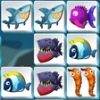
Connect Fish is a captivating free online Mahjong Connect browser game featuring charming sea creature themes. Players match identical fish tiles to clear the board, using strategic moves that require a clear path with no more than two right angle turns. This unblocked game offers 30 challenging levels, each with a ticking timer that adds excitement and urgency. Perfect for both desktop and touchscreen devices, Connect Fish invites players to dive into a relaxing yet engaging puzzle experience that enhances concentration and quick thinking.
Gameplay & Features
- Match pairs of identical fish tiles by connecting them with paths of no more than two right angle turns.
- Complete each level before the timer runs out to progress through 30 levels of increasing difficulty.
- Earn extra points for every second left on the timer, encouraging fast and accurate play.
- Gain bonus points by clearing pairs in rapid succession, rewarding quick reflexes.
- Intuitive controls: use mouse clicks on desktop or taps on touchscreen devices to select tiles.
- Game interface includes pause, full-screen toggle, sound and music controls for a customizable experience.
- Helpful hint and shuffle buttons assist when you get stuck, keeping gameplay smooth and enjoyable.
- Level selection screen features an interactive wave pattern for easy navigation between levels.
- Compact and clear UI with cumulative score, level number, and timer displayed prominently.
Related & Series Games
If you enjoy Connect Fish, explore other thrilling puzzle games like Cookie Connect, which offers sweet tile-matching fun with keyboard and touch controls. Connect 4 is a classic strategy game perfect for quick online matches, playable with simple clicks or taps. For those who love spatial puzzles, Block Connect challenges you to fit blocks into grids using intuitive drag and drop or keyboard controls. Meanwhile, Pipe Connect Puzzle tasks you with connecting pipes to create a water flow, ideal for players who enjoy logic-based browser games. Each title is designed to be accessible, engaging, and playable right now in your browser with no downloads required.
Tips & Strategies
- Plan your moves ahead to ensure you do not block potential matches with no clear path.
- Use the hint button wisely when stuck, but try to rely on your observation skills to improve.
- Clear pairs quickly to maximize your bonus points from rapid succession matches.
- Keep an eye on the timer and prioritize easily connectable pairs to avoid time running out.
- Shuffle tiles when you encounter unsolvable layouts, but use this sparingly as it resets your progress.
- Practice levels multiple times to memorize tile patterns and improve your speed.
Game Elements
- Fish-themed Mahjong tiles with colorful sea creature designs.
- Timer displaying countdown for each level.
- Scoreboard showing cumulative points and level number.
- Control buttons for pause, full-screen, sound, music, hints, and shuffle.
- Level selection interface with wave-pattern arrangement for smooth navigation.
FAQ
Is Connect Fish free to play?
Yes, Connect Fish is completely free to play online.
Can I play Connect Fish on mobile devices?
Absolutely, the game supports touchscreen controls for seamless play on smartphones and tablets.
Is Connect Fish unblocked in schools?
Yes, it is designed as an unblocked browser game accessible in most school networks.
Do I need to download any software?
No downloads are required; simply open your browser and play now.
Does the game have sound and music controls?
Yes, you can toggle audio effects and music on or off during gameplay.