3D Chess
How to Play 3D Chess
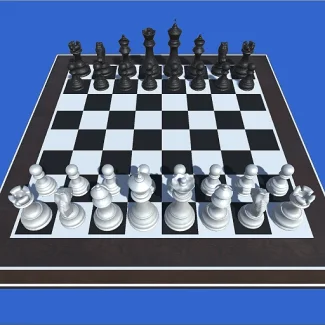
To start your game of 3D Chess, simply choose your mode: play against a friend or the computer. Use your mouse or touch controls to move pieces strategically across the board.
- Mouse: Click to select and move pieces
- Touch: Tap to select and drag pieces
Play 3D Chess: Master the Art of Strategy Online
Engage your mind with 3D Chess, the ultimate brain-teasing game that challenges players to outsmart their opponents. Choose to play against friends or face off against sophisticated AI at four different difficulty levels. With options for both 8x8 and 6x6 boards, you can customize your gameplay experience. Alternate between stunning 3D and classic 2D views to enhance your strategic planning!
3D Chess Gameplay and Features
In 3D Chess, players can enjoy the thrill of intense matches either against a computer opponent or another player. The game features intuitive controls, allowing for smooth navigation and piece movement. Whether you are a beginner or a grandmaster, the adjustable difficulty ensures a suitable challenge for everyone.
- Play against friends or AI with adjustable difficulty
- Choose between 8x8 or 6x6 board sizes
- Switch between 3D and 2D views for varied gameplay
- Instant play with no downloads required
- Compatible with desktop, mobile, and tablet devices
Tips and Strategies for 3D Chess
- Control the center squares for better positioning
- Think multiple moves ahead to counter your opponent
- Utilize your pawns effectively to create openings
- Protect your king while aiming for an aggressive strategy
FAQ
Is 3D Chess free to play?
Yes, 3D Chess is completely free to play online without any downloads.
Can I play 3D Chess on my mobile device?
Absolutely! 3D Chess is compatible with mobile, tablet, and desktop devices.
How can I play 3D Chess for free?
You can access 3D Chess through any web browser without the need to create an account.