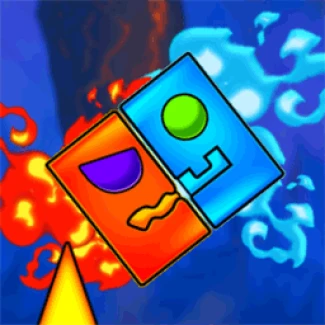
Geometry Dash: Fire And Water
How to Play Geometry Dash: Fire And Water
Mastering the game requires fast reflexes and strategic switching between cubes. Follow these steps:
- Use the spacebar on your keyboard to toggle between the Fire cube and the Water cube instantly.
- Jump automatically or by pressing the up arrow key or W key, depending on the level design.
- On mobile devices, tap the screen to jump and tap a designated button or area to switch cube forms.
- Switch to the Fire cube before touching lava obstacles to avoid damage.
- Switch to the Water cube before crossing icy platforms to stay safe.
- Time your jumps carefully to avoid spikes, gaps, and moving platforms.
- Practice each level repeatedly to memorize hazards and improve your switching accuracy.
Play now for a seamless experience with responsive controls, whether on desktop or mobile browser.
What is Geometry Dash: Fire And Water?
Geometry Dash: Fire And Water is a thrilling twist on the classic Geometry Dash platformer that introduces elemental mechanics to elevate the challenge and excitement. In this free online browser game, players control a cube that can switch between fire and water forms to navigate through hazardous levels filled with obstacles like volcanic lava and icy platforms. The game offers a fresh experience by requiring quick reflexes and strategic switching to survive. With five intense levels to conquer, it's perfect for fans of fast-paced, skill-based games who want to play now without any downloads or restrictions.
Gameplay & Features
- Switch between Fire and Water cubes using the spacebar to safely traverse different terrains.
- Only the Fire cube can touch volcanic lava without taking damage, while the Water cube is immune to icy obstacles.
- Five unique levels that progressively increase in difficulty and complexity.
- Simple keyboard controls optimized for quick reactions and precision timing.
- Free and unblocked gameplay accessible directly in your browser.
- Engaging visuals with elemental effects enhancing the immersive experience.
- Designed for both desktop and mobile play with intuitive touch controls.
- Perfect blend of puzzle-solving and fast-paced platforming challenges.
Related & Series Games
If you enjoy Geometry Dash: Fire And Water, you’ll love exploring other titles in the series that continue to deliver addictive gameplay and innovative mechanics. Geometry Dash Lite offers a lighter version with a variety of levels perfect for beginners and quick sessions. The original Geometry Dash features challenging levels with rhythmic music, requiring precise timing and reflexes. Geometry Vibes brings a fresh soundtrack and new obstacles, making it a favorite for players seeking variety. Meanwhile, Geometry Dash World expands the universe with new levels and characters, supporting both keyboard and touch controls for seamless gameplay on any device.
Tips & Strategies
- Master the timing of your spacebar presses to switch cubes just before encountering hazards.
- Memorize level patterns to anticipate when to switch between Fire and Water forms.
- Stay calm and focus on rhythm-based jumps to avoid mistakes.
- Practice levels multiple times to improve muscle memory and reaction speed.
- Utilize mobile touch controls by tapping to switch forms smoothly during gameplay.
Game Elements
- Fire Cube: Immune to lava, vulnerable to ice.
- Water Cube: Immune to ice, vulnerable to lava.
- Volcanic Lava: Deadly obstacle for Water cube.
- Icy Platforms: Hazardous for Fire cube.
- Obstacles: Spikes, gaps, and moving platforms requiring precise jumps.
- Levels: Five increasing difficulty stages with unique elemental challenges.
FAQ
Is Geometry Dash: Fire And Water free to play?
Yes, it is completely free and accessible online without any charges.
Can I play it on any device?
Yes, it supports browser-based play on desktop and mobile devices.
Is the game unblocked at schools and workplaces?
Yes, it is designed to be unblocked so you can enjoy it anywhere.
Do I need to download anything?
No downloads are required; just play now directly in your browser.
What controls are used?
Keyboard spacebar for switching cubes; touch controls for mobile devices.